Apple Notes API: what exists and what to use instead


People ask me whether Apple Notes has an API. It doesn't, not in the way Notion or Evernote do. Here's what does exist on a Mac and an iPhone, what each can and can't do, and what to use when you need more.
Which one should I use?
Find what you want to do, and the right column is your answer.
| If you want to | Use |
|---|---|
| Read every note from a script on your Mac | AppleScript, or Python running it through osascript |
| Add to a note from your iPhone, by tapping or on a schedule | Shortcuts: Append to Note, or Append Checklist Item |
| Take a copy of one note | Export, as Markdown on iOS 26 and macOS 26 |
| Let Claude on your Mac search and edit notes | Claude's Apple Notes extension, or a community MCP server |
| Let ChatGPT or Claude on the web or iPhone use your notes | Not possible with Apple Notes; use a notes app with an API |
What exists
| What it can do | Limits | |
|---|---|---|
| AppleScript (and JavaScript for Automation), on a Mac | List folders and notes, read a note's title, dates and body, create notes and change their body | Bodies are HTML; locked notes can't be read; needs your Automation permission |
| Shortcuts, on iPhone and Mac | Actions such as Create Note, Append to Note, Append Checklist Item, Set Checklist Items Checked, Move Notes to Folder, Pin or Unpin Notes and Delete Notes | Runs on the device, when you or an automation start it |
| Export, on Mac and iPhone | Export a note, including as markdown on macOS 26 and iOS 26 | One note at a time; a copy, not a live connection |
| The Notes database, on a Mac | Read what the app stores, in an undocumented format | Protected by Full Disk Access; the format can change with any update; read-only in practice |
The action names above are the ones the Notes app offers Shortcuts on macOS 26.5, read from the app itself; Apple describes Shortcuts' recent additions in What's new in Shortcuts. On devices with Apple Intelligence, the Use Model action can put a model, including ChatGPT, between those actions: for example, ask it to summarize some text and append the result to a note.

AppleScript, and Python on top of it
On a Mac, the Notes app answers AppleScript. This lists every note's title, reads the first note's body (it comes back as HTML) and makes a new note in the Notes folder:
AppleScript: list, read and make notes
tell application "Notes"
	set titles to name of every note
	set firstBody to body of note 1
	make new note at folder "Notes" with properties {name:"Groceries", body:"<h1>Groceries</h1><div>Milk</div>"}
end tell
Run it in Script Editor, or save it and run osascript notes.applescript in Terminal.
Python has no Notes library of its own; it runs the same script through osascript. The first time, macOS asks whether your terminal may control Notes, under Privacy & Security, Automation.
Python: every note's title
import subprocess

script = 'tell application "Notes" to get name of every note'
out = subprocess.run(["osascript", "-e", script], capture_output=True, text=True)
print(out.stdout)
Locked notes don't open this way, and the script runs only on a Mac that's on and signed in.
Or ask an AI to write the script
Write an AppleScript for the Notes app on macOS that [what you want, for example: appends today's date and a line of text to the note called "Work log"]. Notes stores note bodies as HTML, so read and write the body as HTML. Then show me how to run it from Terminal with osascript.
Fill in the brackets and paste it into ChatGPT, Claude or Gemini. Read the script before you run it: it can change your notes.
What people build on it
Most “Apple Notes API” projects on GitHub are MCP servers that drive the Notes app with AppleScript, so Claude Desktop or Claude Code can search and edit notes on that Mac. Can Claude read your Apple Notes? goes through those options and their limits, and Apple Notes MCP servers compared sets the main servers side by side. Exporters that turn every note into markdown files are the other common kind; exporting Apple Notes to Markdown covers those and the built-in export.
Amber Notes uses the same two doors when it imports: AppleScript to read your notes, and, if you ask it to keep your pins, the notes database, which is why that option asks for Full Disk Access. It only reads; nothing in Apple Notes changes.
What to use when you need a real API
If you want something outside your Mac to read and write your notes, whether that's ChatGPT on your phone, a script on a server or a coding agent, the notes need to live in an app that has an API of its own. Notion and Evernote have one. Amber Notes, the notes app for iPhone and Mac that I make, has an MCP server built in, which is the kind of API AI apps speak:
- Tools to search, read, create and edit notes, with precise edits (
edit_note,append_to_note,set_checklist_item) instead of rewriting a whole note. - Sign-in with OAuth and your approval in the app, read only or read and edit, or an access token for scripts, Claude Code and Codex.
- Every change keeps the previous version, so a bad edit can be put back.
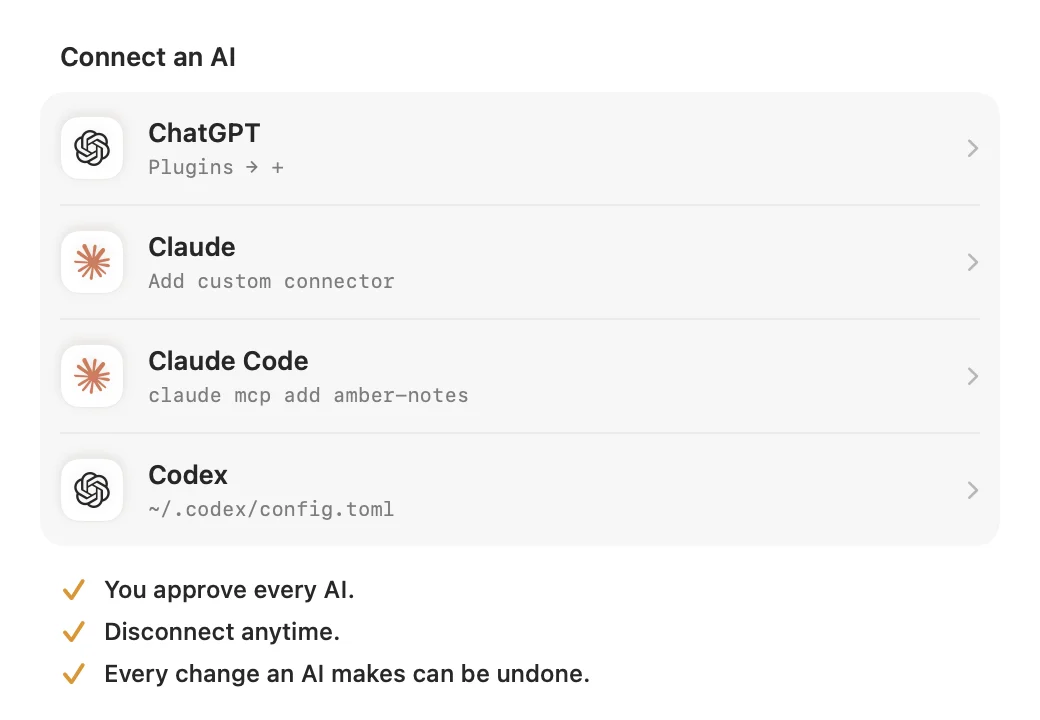
ChatGPT, Claude, Claude Code, Codex and Incredible can all use it. The Amber Notes MCP server page has the address and every tool, and moving from Apple Notes takes one import on your Mac.
Notes with an API ChatGPT and Claude can use
Amber Notes works like Apple Notes, imports your notes from it, and has the MCP server built in.
Download Amber Notes for MacThe iPhone app is coming to the App Store soon. Amber Notes is on Mac today: send yourself the link to open there.
Send myself the linkAmber Notes is for iPhone and Mac. Send yourself the link to open on one.
Send myself the linkFree, for macOS 26 or later. Importing from Apple Notes only reads it; nothing there changes.
Questions
Does Apple Notes have an API?
No. Apple doesn't offer a public web or cloud API for Notes, and outside services can't reach your notes in iCloud. On a Mac you can script the Notes app with AppleScript, and on iPhone and Mac you can use its Shortcuts actions, but both run on your own device.
Can I read Apple Notes from Python?
On a Mac, yes: Python can run an AppleScript through the osascript command, and the Notes app answers with each note's title, dates and body as HTML. It needs the Notes app on that Mac and your permission under Privacy & Security, Automation.
Can an AI use Apple Notes through an API?
Only on a Mac, through community MCP servers or Claude's desktop extension, which drive the Notes app with AppleScript. Nothing in the cloud can reach Apple Notes, so ChatGPT or Claude on the web and on iPhone can't.
Checked against the app on .